
IBM i2 Analyst’s Notebook (ANB) is a program for visualising data that helps analysts uncover hidden connections and identify patterns. IBM i2 Information Exchange for Analysis (iXa) is a search tool that integrates with ANB to provide database connectivity and searching capabilities.
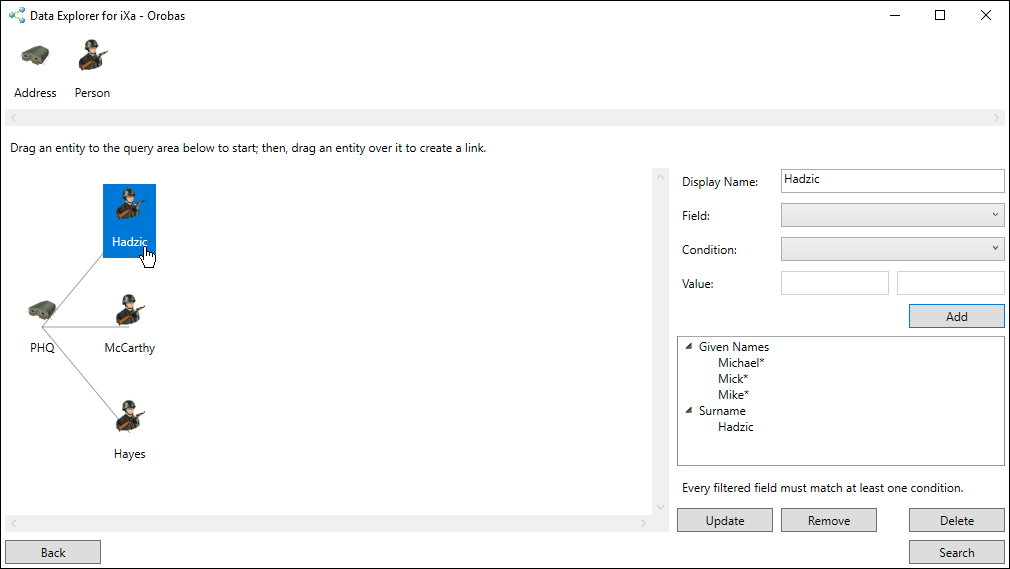
The standard way of using iXa works well for simple searches and expands; however, complex queries are not inherently possible and require a lot of time and effort by the user. For example, an analyst might be trying to find three people connected to one address with limited information about the location and who lives there.
Data Explorer for iXa uses existing iXa database connections to allow the analyst to draw a picture of the information they are trying to identify. To do this, the application is launched from within Analyst’s Notebook.

The database is selected.

The query is “drawn” by dragging and dropping icons from the list of entity types at the top into the drawing area at the bottom. Connections are automatically created as entities are dropped, and they can be filtered on the right-hand side.
The query is then run, resulting in a list of all the results that match the query. The results can either be added to an Analyst’s Notebook chart or exported to a text file.

The video below shows this process in real time using a database with 13 million records.